
Our Work / AI & Cloud
Daily cloud cost reports, usage-to-invoice checks and faster API support
An example API company gets a daily cost and usage report with anomaly alerts in Slack, usage checked against Stripe invoices, and drafted support replies from its docs.
Example project · Updated
The problem
A 25-person AI platform company in Bengaluru selling a document-processing API to developers in India, the UK and the US, billed by usage through Stripe.
- See yesterday's cloud cost and usage every morning, with unusual changes flagged.
- Check every invoice against metered usage before it goes to the customer.
- Answer routine API questions quickly from the docs, and get hard ones to an engineer with context.
How it works
Cost Watch, step by step
- 01Pull cost and usage each nightAWS Cost Explorer
- 02Spot unusual changesn8n
- 03Morning report in SlackSlack
- 04Alerts go to an ownerSlack
- 05Reconcile usage against StripeStripe
- 06Draft support replies from the docsClaude
- 07Escalate to engineersLinear
- 08Weekly margin viewGoogle Sheets
Full project details +Hide details −
The situation
Their workloads run on AWS with some GPU capacity from a second provider. Usage is metered in their own database and pushed to Stripe at month end. Cloud costs are checked when the bill arrives, and API support questions come in through email and a help widget, answered by whichever engineer is free.
Cost surprises arrive late. A misconfigured job or a runaway retry loop can burn GPU hours for days before anyone sees it on the monthly bill.
Nobody can say quickly what each customer costs to serve. Cloud spend, metered usage and revenue live in three places, so margin per customer is a quarterly spreadsheet exercise.
Billing gaps go unnoticed. If the usage export to Stripe fails for one account or double-counts a day, the invoice is wrong and the team only hears about it when a customer complains or never pays.
Engineers spend hours a week on support questions that the docs already answer: rate limits, error codes, authentication and file size limits. Harder questions wait behind them.
Each step
1. Pull cost and usage each night. Cloud billing exports and the GPU provider's usage API are read into one table, tagged by service, environment and, where tags allow, customer. Metered API usage is read from the company's own database for the same day.
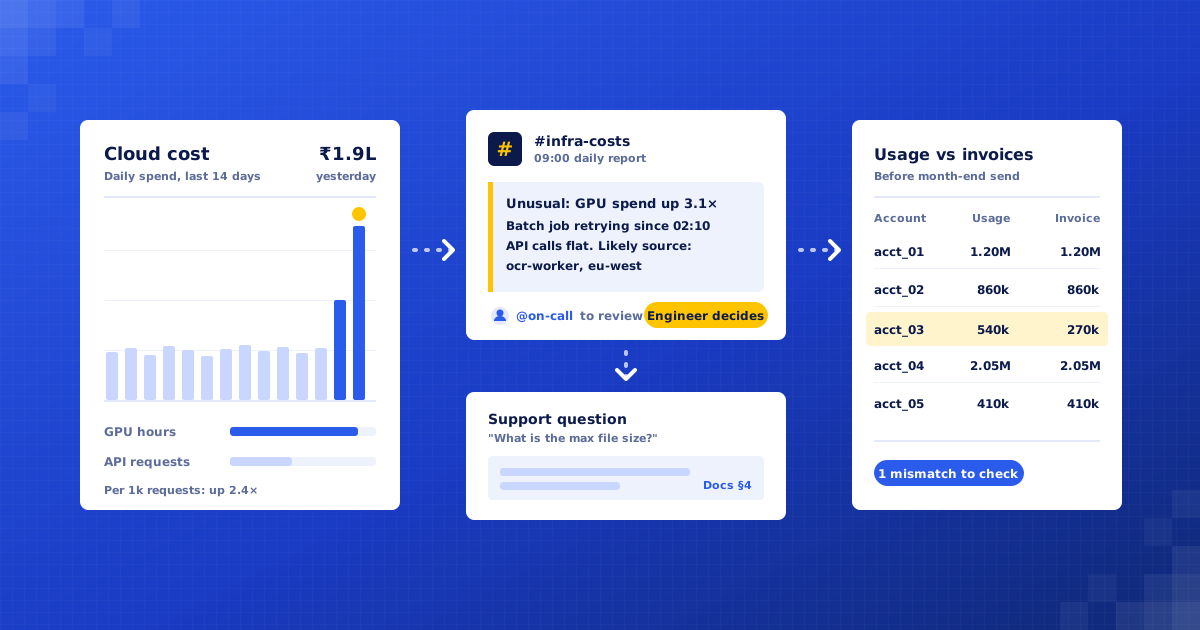
2. Spot unusual changes. Each service and customer is compared with its own recent pattern, not a fixed threshold. A jump in GPU hours with flat API calls, or a new region appearing, is flagged with the likely source.
3. Morning report in Slack. At 9:00 a short report lands in #infra-costs: yesterday's spend by service, the top customers by cost, cost per thousand requests, and anything flagged. Each line links to the underlying data.
4. Alerts go to an owner. A flagged anomaly tags the on-call engineer with a plain explanation of what changed. The system suggests where to look but never stops, scales or deletes anything. That decision stays with the engineers.
5. Reconcile usage against Stripe. Before invoices are finalised, metered usage per account is compared with the Stripe line items. Missing usage, duplicated days, wrong price tiers and accounts with usage but no subscription are listed for finance to check.
6. Draft support replies from the docs. New API questions are matched against the docs, changelog and past answered tickets. Claude drafts a reply that quotes the relevant section and links to it. If the docs do not answer the question, it says so rather than guessing.
7. Escalate to engineers. Bug reports, outages, account-specific errors and anything involving billing disputes go straight to an engineer, with the customer's recent request logs and error rates attached so they can start without digging.
8. Weekly margin view. Every Monday, a sheet shows revenue, cloud cost and margin per customer and per product tier for the past week, so pricing conversations start from real numbers.
What we build
Cost and usage collector. Brings cloud bills, GPU usage and metered API calls into one daily table.
Anomaly checker. Compares each service and customer with its own recent pattern and flags changes.
Slack morning report. A short daily summary of spend, cost per request and open flags.
Billing reconciliation. Checks metered usage against Stripe invoice lines before invoices go out.
Support reply assistant. Drafts answers from the docs and routes hard questions to engineers.
Connects to: AWS Cost Explorer, Stripe, Slack, Claude, n8n, PostgreSQL, Linear, Intercom, Google Sheets.
People stay in control
Engineers decide on every infrastructure change. The system reports and suggests; it never scales, stops or deletes resources.
Finance reviews every reconciliation mismatch before an invoice is corrected or sent.
Support drafts are approved by an engineer at first, then only routine categories are sent automatically once the team is happy with them.
Questions about outages, bugs, security or billing disputes always go to a person.
Rollout
Week 1: Audit the data. Map cloud accounts, tagging, the usage database and the Stripe setup. Read a sample of recent support tickets and agree which ones are routine.
Weeks 2–3: Build reports and reconciliation. Set up the nightly data pull, the Slack report and anomaly flags, then the usage-to-Stripe check against last month's invoices.
Week 4: Support assistant in draft mode. Connect the docs and ticket history. Every drafted reply is reviewed by an engineer, and we fix the gaps they find.
Weeks 5–6: Go live and tune. Tune anomaly sensitivity so alerts stay rare and useful, run the first live month-end reconciliation, and agree which support categories can go out without review.
Where the value comes from
Cost problems found in a day, not a month. A runaway job shows up in the next morning's report instead of on the monthly bill.
Fewer billing errors. Missing or duplicated usage is caught before invoices are finalised, rather than after a customer queries them.
Clear margin per customer. Cost and revenue sit side by side each week, so pricing and tier decisions use current numbers.
Engineer time back from support. Questions the docs already answer are drafted automatically, leaving engineers the ones that need them.
Faster answers for developers. Routine questions get a reply with the right doc link quickly, and escalations arrive with logs attached.
What to measure: Time from a cost anomaly starting to someone looking at it; Invoice corrections after sending, per month; Usage-to-invoice mismatches caught before sending; Median time to first reply on API support questions; Engineer hours per week on support.
Your numbers
What could this be worth to you?
These are your inputs, not our claims. Change any number to match your business.
Time and money saved, estimated
₹75,000
per month · ₹9,00,000 per year
About 50 hours of manual work handled for you each month.
What would this cost us?
We give a fixed quote after a free 30-minute audit, once we know your cloud accounts, billing setup and support volumes.
Will it change our infrastructure on its own?
No. It only reads billing and usage data and reports what it sees. Any scaling, shutdown or configuration change is made by your engineers.
We use GCP and Paddle, not AWS and Stripe. Does that matter?
No. The same design works with GCP, Azure and most billing tools with an API. We confirm the details in the audit.

Find your first automation in 30 minutes.
Free audit. Fixed quote after. No surprises.
Book free audit ↗