
Our Work / Cybersecurity
Security questionnaire drafts, alert summaries and audit evidence on autopilot
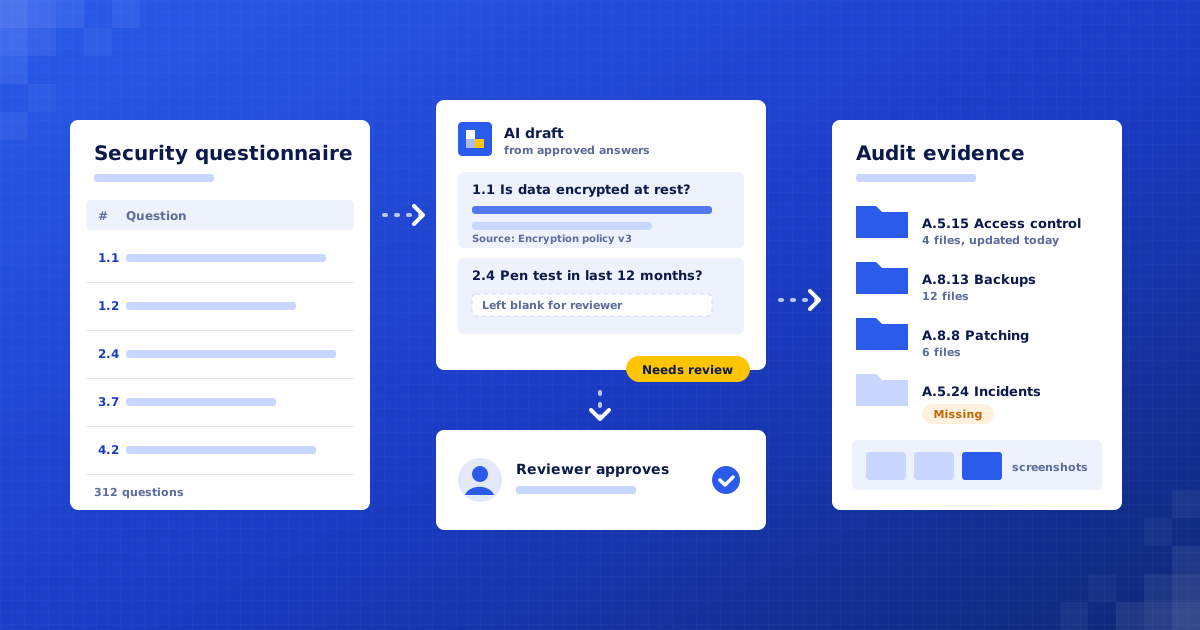
An example cybersecurity consultancy gets first drafts of security questionnaires from an approved knowledge base, short alert summaries for analysts, and audit evidence collected per control. Analysts make every security decision.
Example project · Updated
The problem
A cybersecurity consultancy in Hyderabad with 25 people, running a small security operations centre (SOC) for mid-sized clients and helping them through ISO 27001 and SOC 2 audits.
- Produce a reviewed first draft of any questionnaire in a fraction of the current time.
- Use only approved, current answers, with a clear source for each one.
- Give analysts a short summary with context on every alert, and keep audit evidence filed per control all year.
How it works
Questionnaire Desk, step by step
- 01Build the approved knowledge baseConfluence
- 02Read the questionnairen8n
- 03Draft answers with sourcesClaude
- 04Review before anything is sentGoogle Sheets
- 05Summarise each alertMicrosoft Sentinel
- 06Analyst decidesJira
- 07Collect audit evidence on a schedulen8n + Google Drive
- 08Flag gaps before the auditSlack
Full project details +Hide details −
The situation
They answer around 15 security questionnaires and RFPs a month, each with 150 to 400 questions, for themselves and on behalf of clients. Answers are copied from old spreadsheets. Analysts work through a few hundred alerts a day across client SIEMs. Before each audit, someone spends days taking screenshots and exports and filing them by control.
Questionnaires eat senior time. The same questions about encryption, access reviews and incident response come up every week, but the best previous answer is hard to find and often out of date.
Copying old answers is risky. A response written for one client, or before a policy changed, can end up in a document another client relies on.
Alert queues are noisy. Analysts open each alert, pull context from several tools and write notes before they can even decide whether it matters.
Audit evidence is collected in a rush. Screenshots and exports are gathered by hand in the weeks before an audit, filed inconsistently, and some go missing.
Each step
1. Build the approved knowledge base. Policies, past questionnaire answers and certificates are collected into one knowledge base. Each answer has an owner and a review date, and only approved answers are used for drafting.
2. Read the questionnaire. An uploaded spreadsheet, Word file or portal export is split into individual questions, keeping the original layout so answers can be written back in place.
3. Draft answers with sources. Claude matches each question to approved answers and writes a draft, citing the source. Where nothing approved fits, or the question asks about a specific commitment, the answer is left blank and marked 'needs review'.
4. Review before anything is sent. The draft goes to the named reviewer with flagged questions listed first. Nothing leaves the company until a person has checked and approved it. New answers they write can be added to the knowledge base after approval.
5. Summarise each alert. When a new alert arrives in the SIEM, related events, asset owner and recent similar alerts are pulled together. Claude writes a short summary of what happened and what to check first, added to the case.
6. Analyst decides. The analyst reads the summary and decides whether to close, investigate or escalate. The system never closes an alert, blocks a user or isolates a device on its own.
7. Collect audit evidence on a schedule. Each control is linked to the evidence it needs. On a set schedule, screenshots and exports such as user access lists, backup logs and patch reports are captured and saved into a folder per control, with the date in the file name.
8. Flag gaps before the audit. A weekly check lists any control with missing or out-of-date evidence and sends it to the compliance lead in Slack, so gaps are fixed months before the auditor asks.
What we build
Questionnaire assistant. Drafts answers from approved sources and marks uncertain ones 'needs review'.
Approved knowledge base. Current, owned answers and policies, each with a review date.
Alert summariser. Adds context and a plain-English summary to each alert for the analyst.
Evidence collector. Saves screenshots and exports into a dated folder per control on a schedule.
Weekly evidence check. Lists missing or stale evidence for the compliance lead.
Connects to: Claude, n8n, Confluence, Google Drive, Google Sheets, Microsoft Sentinel, Jira, Slack.
People stay in control
A named reviewer checks and approves every questionnaire before it is sent.
Answers not backed by an approved source are left blank and marked 'needs review', never invented.
Analysts make every alert decision. Nothing is closed, blocked or isolated automatically.
The compliance lead owns the control list and decides what counts as valid evidence.
Rollout
Week 1: Audit and gather sources. Read recent questionnaires, alert workflows and the last audit's evidence. Agree which answers and policies are approved.
Weeks 2–3: Build the questionnaire assistant. Set up the knowledge base and drafting flow. Test it on past questionnaires and compare with the answers that were actually sent.
Week 4: Alert summaries in shadow mode. Summaries are written for live alerts but kept to one analyst at first. We fix missing context and wording.
Weeks 5–6: Evidence collection and go live. Map controls to evidence, schedule collection, and switch on the weekly gap check. Review all three helpers weekly for the first month.
Where the value comes from
Questionnaires turned round faster. Reviewers start from a sourced draft instead of a blank sheet, so senior time goes on the hard questions.
More consistent answers. Every draft comes from the same approved, dated sources, so out-of-date or wrong-client answers are less likely.
Analysts reach a decision sooner. Context and a summary are on the alert when it is opened, so less time goes on gathering it.
Calmer audits. Evidence is collected all year and filed per control, so there is no last-minute scramble.
Gaps found early. Missing evidence is flagged weekly, while there is still time to fix the underlying control.
What to measure: Hours from questionnaire received to approved response; Share of drafted answers changed by the reviewer; Median time from alert to analyst decision; Controls with complete, current evidence; Hours spent preparing evidence before each audit.
Your numbers
What could this be worth to you?
These are your inputs, not our claims. Change any number to match your business.
Time and money saved, estimated
₹90,000
per month · ₹10,80,000 per year
About 75 hours of manual work handled for you each month.
What does it cost?
We give a fixed quote after a free 30-minute audit, once we know your questionnaire volume, tools and audit frameworks.
Could the AI give a client a wrong answer about our security?
It only drafts from answers you have approved, shows the source for each, and leaves anything uncertain blank for review. A person approves every questionnaire before it is sent.
Does client data leave our environment?
We agree this in the audit. The system can run in your own cloud account, and we use AI providers that do not train on your data.

Find your first automation in 30 minutes.
Free audit. Fixed quote after. No surprises.
Book free audit ↗