
Work / Construction & trades
From first enquiry to paid invoice without the paperwork chase
Enquiries answered fast, site visits booked, quotes built from templates and photos, jobs scheduled and invoices chased politely until paid.
The problem
A renovation and interiors contractor in Ahmedabad with 25 site staff, doing kitchens, bathrooms and full-flat refurbishments.
- Reply to every enquiry within minutes and get a site visit booked without phone tag.
- Send a clear, accurate quote within a day or two of the site visit.
- Collect stage and final payments on time with no awkward manual chasing.
How it works
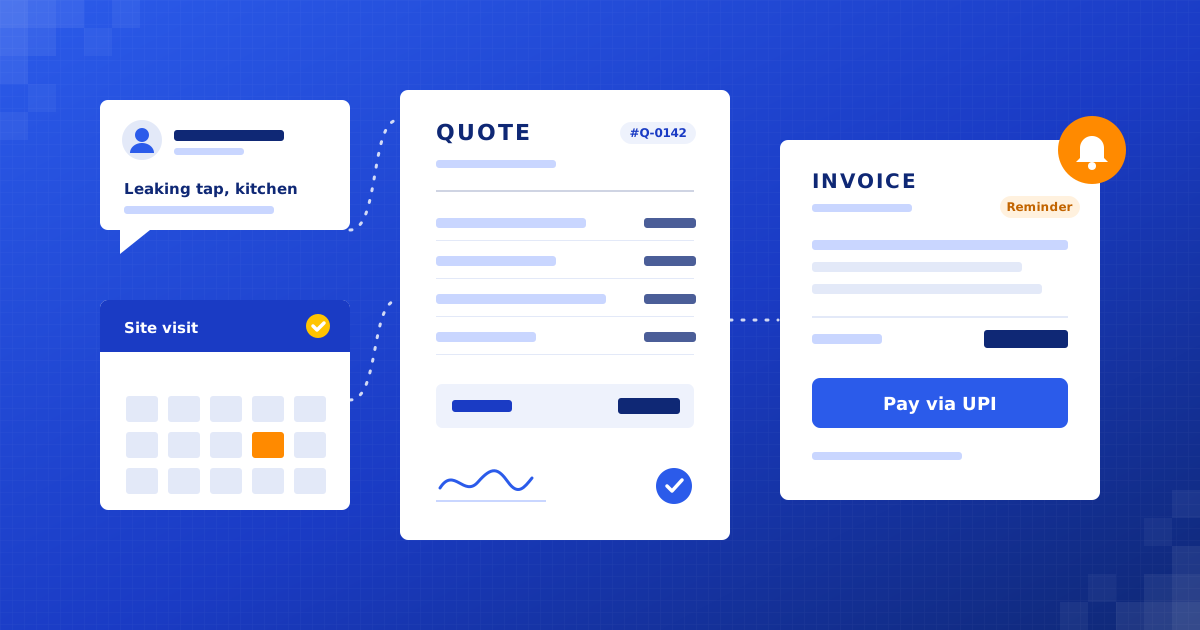
Quote-to-Cash Flow, step by step
- 01Capture every enquiryMake + WhatsApp Business API + Zoho CRM
- 02Instant reply and qualifying questionsWhatsApp Business API
- 03Site visit bookingCal.com + Google Calendar
- 04Site survey formAppSheet
- 05Quote assemblyGoogle Sheets + OpenAI API + Google Docs
- 06Approval and sendZoho CRM + WhatsApp Business API
- 07Follow-ups and job schedulingZoho CRM + Google Calendar
- 08Invoices and payment remindersZoho Books or Tally + Razorpay
Full project details +Hide details −
The situation
Enquiries come in through WhatsApp, Instagram, Google Business Profile calls and a website form, around 80 a month. The owner and one estimator book site visits by phone, type quotes in Excel, and send them as PDFs on WhatsApp. Invoices are raised in Tally and payment is chased by the owner when he remembers.
Enquiries that arrive while the team is on site wait hours for a reply, and some are never answered.
Quotes take days to send because the estimator rebuilds each one from scratch.
Nobody follows up on sent quotes in a structured way, so interested customers drift off.
Stage payments and final invoices are chased by hand, which strains cash flow and customer relationships.
Each step
1. Capture every enquiry. WhatsApp, Instagram, the website form and missed calls all create one lead record. Repeat enquiries from the same number are merged, not duplicated.
2. Instant reply and qualifying questions. Within a minute, the customer gets a reply in English, Hindi or Gujarati asking job type, area, rough size and timeline. After 8pm, the reply says the team will confirm in the morning.
3. Site visit booking. Qualified leads get a booking link showing the estimator's free slots, grouped by area so visits in the same part of the city land on the same day. A reminder goes out the evening before.
4. Site survey form. On site, the estimator fills a mobile form with measurements, material choices and photos. It works offline and syncs once there is signal.
5. Quote assembly. The form fills a quote from priced line-item templates. An AI step turns the estimator's notes into a clear scope of work and flags anything not covered by a template for manual pricing.
6. Approval and send. The owner reviews the quote on his phone, adjusts if needed and approves. The customer gets a branded PDF and an accept link on WhatsApp and email.
7. Follow-ups and job scheduling. Unanswered quotes get two friendly nudges spread over a week, then a final check-in, then the lead is closed. Accepted quotes create a job with start date, crew and material order list.
8. Invoices and payment reminders. Stage invoices are raised when a milestone is marked done, with a UPI payment link. Reminders go out before and after the due date. Failed or partial payments alert the owner instead of sending another reminder.
What we build
Unified enquiry inbox. Every channel lands in one CRM pipeline with source, area and job type, so nothing is lost on someone's personal phone.
Visit scheduler. Area-aware booking that keeps estimator travel sensible and sends reminders to cut no-shows.
Quote builder. Priced templates plus survey data and photos produce a consistent quote that the owner approves before sending.
Job tracker. Accepted quotes become jobs with milestones, crew and materials, visible to the whole team.
Payment chaser. Stage invoices with payment links and reminders that stop the moment payment lands.
Connects to: WhatsApp Business API, Instagram, Google Business Profile, Zoho CRM, Cal.com, Google Calendar, AppSheet, OpenAI API, Zoho Books or Tally, Razorpay.
People stay in control
The owner approves every quote before it reaches a customer.
Line items outside the templates are priced by the estimator, never by AI.
Disputed or partly paid invoices go to the owner for a personal call.
Customers can reply at any point and reach a real person.
Rollout
Week 1: Map the process and price list. Walk through a recent job end to end, collect the price list and turn the most common jobs into quote templates.
Week 2: Enquiry capture and booking. Connect WhatsApp, Instagram and the website form, set up instant replies in three languages and switch on site visit booking.
Week 3: Survey form and quote builder. Build the mobile survey form and quote assembly, then run them alongside the old Excel process on real jobs to check prices match.
Week 4: Jobs, invoices and reminders. Connect accepted quotes to job scheduling and invoicing, set reminder timing and train the team on the handful of screens they use.
Where the value comes from
More enquiries become visits. Fast replies and self-booking reach customers while they are still deciding, before they call the next contractor.
More quotes accepted. Quotes go out sooner, look professional and get followed up every time, which is where most lost jobs slip away.
Estimator time. Templates and survey data remove retyping, so the estimator can cover more visits in a week.
Cash flow. Stage invoices go out the day a milestone is done and reminders run on their own, so money comes in sooner.
What to measure: Median first reply time to enquiries; Share of enquiries that book a site visit; Days from site visit to quote sent; Quote acceptance rate; Average days from invoice to payment.
Your numbers
What could this be worth to you?
These are your inputs, not our claims. Change any number to match your business.
Extra revenue, estimated
₹2,04,000
per month · ₹24,48,000 per year
About 2.4 extra enquiries won each month at your numbers.
How much would this cost for our business?
It depends on your channels and how many job types you quote. We give a fixed quote after a free 30-minute audit of your current process.
Where is customer data and site photo data stored?
In your own CRM, Google Drive and accounting tools, under your accounts. We set access by role and you can remove our access when the handover is done.
We use Tally and a basic Excel price list. Is that enough?
Yes. We build on what you already have. Tally, Zoho Books and QuickBooks all work, and your Excel price list becomes the quote templates.

Find your first automation in 30 minutes.
Free audit. Fixed quote after. No surprises.
Book free audit ↗