
Work / Accounting firms
Collecting client documents and posting entries without the chasing
An example CA firm gets automatic chasing for missing documents, invoice and bank statement extraction, posting to Tally or Xero, and partner review.
The problem
A chartered accountancy firm in Surat with eight staff, doing monthly bookkeeping and GST returns for about 120 small businesses.
- Get complete client documents earlier, without phone chasing.
- Extract and post routine entries automatically, with exceptions flagged.
- Give partners time to review properly before filing.
How it works
Books Inbox, step by step
- 01Monthly checklist per clientWhatsApp Business API
- 02One upload pointGoogle Drive
- 03Chase what is missingn8n
- 04Read the documentsClaude
- 05Match and categoriseGoogle Sheets
- 06Flag exceptionsClaude
- 07Approve and postTally Prime
- 08Partner reviewGoogle Sheets
Full project details +Hide details −
The situation
Clients send purchase invoices, sales bills and bank statements over WhatsApp, email and the odd pen drive. Staff chase missing documents by phone, then type entries into Tally by hand. Everything bunches up in the days before GST filing.
Chasing documents is a job in itself. Staff make the same calls every month, and the firm only finds out what is missing when it starts the books.
Manual entry is slow and error-prone. A wrong GSTIN or a mistyped amount causes mismatches that take far longer to find than to make.
Work arrives in a rush before filing dates, so overtime spikes and quality drops exactly when it matters most.
Partners review late, with little time to spot unusual transactions or advise clients.
Each step
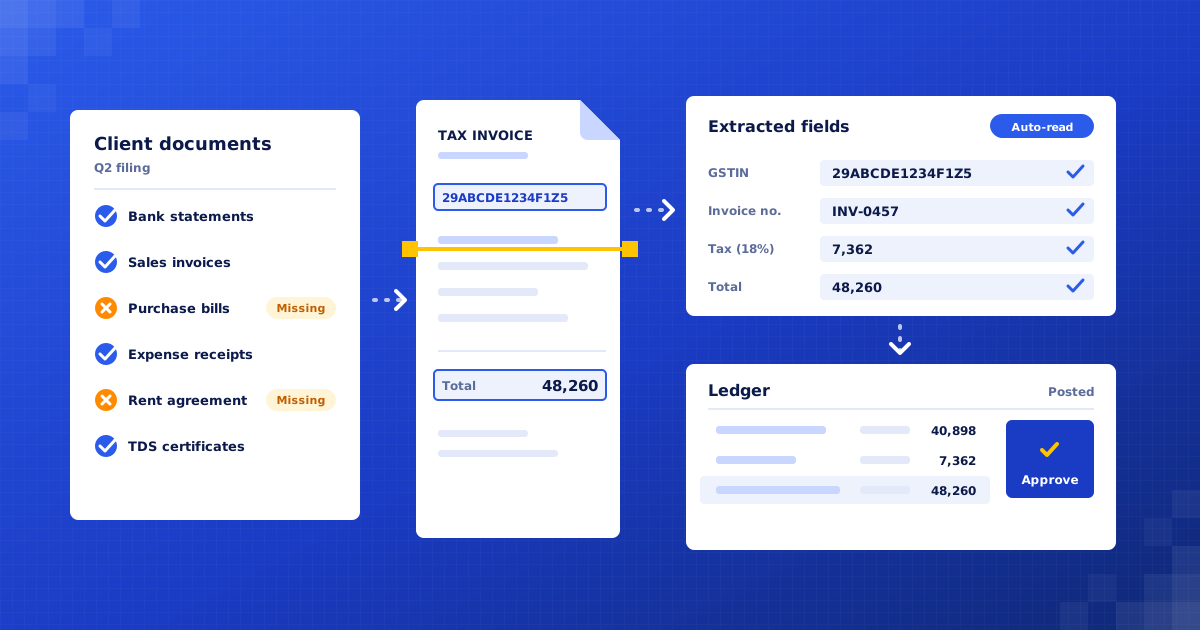
1. Monthly checklist per client. At the start of each month, each client gets a WhatsApp checklist based on what they normally send: bank statements, sales bills, purchase invoices, expense receipts.
2. One upload point. Clients reply with photos or PDFs on WhatsApp, forward to a dedicated email, or upload to a shared folder. Each file is tagged to the right client and month automatically.
3. Chase what is missing. The checklist ticks itself off as documents arrive. Missing items get a gentle reminder after a few days, then a firmer one, then the staff member is alerted to call. Duplicate uploads are detected and ignored.
4. Read the documents. Invoices are read for supplier, GSTIN, invoice number, date, taxable value, tax and total. Bank statements are parsed line by line, including scanned PDFs. Blurry or incomplete files are sent back to the client with a request for a clearer copy.
5. Match and categorise. Bank lines are matched to invoices and ledgers using past entries for that client. GSTINs are checked for valid format and the totals are recomputed to catch errors.
6. Flag exceptions. Unmatched payments, new suppliers, duplicate invoice numbers, cash payments above limits and GST mismatches are flagged with a short note on why.
7. Approve and post. A staff member reviews the prepared entries in a batch and approves them. Approved entries are posted to Tally, Xero or QuickBooks. Nothing posts without approval.
8. Partner review. Before GST filing, the partner gets a one-page summary per client: totals, open exceptions and anything unusual compared with previous months.
What we build
Document collector. Checklists, reminders and one upload point per client.
Extraction engine. Reads invoices and bank statements into structured data.
Matching and exception rules. Matches bank lines to invoices and flags anything unusual.
Posting connector. Posts approved entries into Tally, Xero or QuickBooks.
Client status board. Shows each client's documents, open exceptions and filing readiness.
Connects to: WhatsApp Business API, Google Drive, Gmail, Claude, n8n, Tally Prime, Xero, QuickBooks, Google Sheets.
People stay in control
Staff approve every batch of entries before anything is posted.
All flagged exceptions are resolved by a person, not guessed by the system.
A partner signs off each client's summary before returns are filed.
Client documents stay in the firm's own storage with access limited to assigned staff.
Rollout
Week 1: Audit clients and ledgers. Group clients by how they send documents and what they need. Pick ten typical clients for the pilot.
Weeks 2–3: Build the pipeline. Set up checklists, upload points, extraction, matching rules and the Tally or Xero connection.
Week 4: Run on last month's documents. Process a completed month for the pilot clients and compare every entry with what staff posted by hand.
Weeks 5–6: Go live and extend. Run the pilot clients live, tune the rules, then bring the rest of the clients on in groups.
Where the value comes from
Documents arrive earlier. Automatic checklists and reminders replace phone chasing, so the month's work starts sooner and the deadline rush shrinks.
Less manual entry. Routine invoices and bank lines are prepared automatically, so staff review rather than type.
Fewer filing errors. GSTINs, totals and duplicates are checked every time, catching mistakes before they reach a return.
More clients per person. The time saved on chasing and typing lets the same team serve more clients without longer hours.
Better partner advice. Partners see a clear summary and exceptions early, leaving time to spot issues and talk to clients.
What to measure: Days from month end to complete documents; Share of entries posted without manual edits; Exceptions per client per month; Staff hours per client per month; Returns filed ahead of the due date.
Your numbers
What could this be worth to you?
These are your inputs, not our claims. Change any number to match your business.
Time and money saved, estimated
₹72,000
per month · ₹8,64,000 per year
About 180 hours of manual work handled for you each month.
What does it cost?
We give a fixed quote after a free 30-minute audit, once we know your client count, document volumes and accounting software.
Is client financial data safe?
Documents stay in your firm's own storage, access is limited to assigned staff, and the AI services we use do not train on your data.
Does it work with Tally?
Yes. We post to Tally Prime, Xero, QuickBooks and Zoho Books. For older Tally setups we can prepare import files instead.

Find your first automation in 30 minutes.
Free audit. Fixed quote after. No surprises.
Book free audit ↗