
Work / Clinics & healthcare
Keeping a clinic's diary full with reminders and a smart waitlist
An example dental clinic gets online booking, WhatsApp reminders, waitlist refills on cancellation and post-visit follow-ups, with staff in control.
The problem
A three-chair dental clinic in Mumbai with two dentists, a hygienist and two front-desk staff.
- Cut no-shows and late cancellations with timely reminders and easy rescheduling.
- Refill cancelled slots automatically from a waitlist.
- Take routine booking work off the front desk without touching clinical decisions.
How it works
Full Diary, step by step
- 01Book online or on WhatsAppWhatsApp Business API
- 02Route anything clinicalClaude
- 03Confirm and remindn8n
- 04Chase unconfirmed slotsGoogle Sheets
- 05Refill from the waitlistPractice software API
- 06Post-visit follow-upWhatsApp Business API
- 07Recall and reviewsGoogle Business Profile
Full project details +Hide details −
The situation
They see about 800 appointments a month, booked mostly by phone and WhatsApp. The front desk keeps the diary in practice software and sends reminders by hand when they have time. Cancellations are often only discovered when the patient does not turn up.
No-shows leave expensive chair time empty. A dentist and assistant are paid whether the patient comes or not, and the slot cannot be resold at five minutes' notice.
The front desk spends much of the day on the phone booking, confirming and rescheduling, while patients at the counter wait.
When someone cancels, there is a list of patients who wanted an earlier slot, but nobody has time to ring round, so the gap stays empty.
After treatment, follow-up depends on memory. Patients due for a check-up or the second stage of a treatment drift away.
Each step
1. Book online or on WhatsApp. Patients choose a treatment type and see real free slots from the diary. New patients give consent for reminders and data use at booking, recorded with a timestamp.
2. Route anything clinical. If a patient mentions pain, swelling, bleeding or an emergency, the assistant does not give advice. It tells them a staff member will call, and alerts the front desk at once. Out of hours, it gives the clinic's emergency guidance.
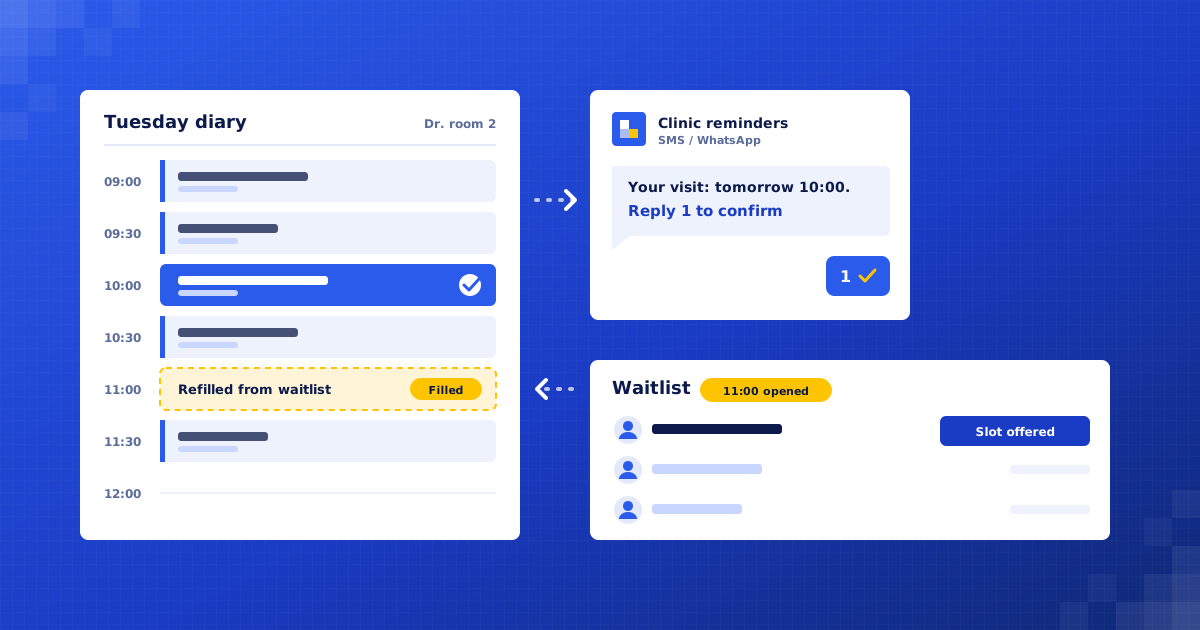
3. Confirm and remind. A confirmation goes out at booking, then a reminder two days before asking the patient to confirm, and a short reminder on the morning. Each message has one-tap confirm, reschedule or cancel.
4. Chase unconfirmed slots. If a patient has not confirmed by the evening before, the front desk sees them on a short call list, rather than finding out when the chair is empty.
5. Refill from the waitlist. When a slot frees up, waitlisted patients who fit the treatment length are offered it in turn. The first to accept gets it, and the others are told it has gone so nobody is double-booked.
6. Post-visit follow-up. The day after treatment, patients get the aftercare sheet the dentist chose and a check-in message. Any reply mentioning a problem goes to staff, not the bot.
7. Recall and reviews. Patients due for a check-up or the next treatment stage are reminded to book. Satisfied patients are asked for a Google review. Anyone who opts out is never messaged again.
What we build
Booking assistant. Books and reschedules routine appointments from live diary availability.
Reminder engine. Sends confirmations and reminders and records each patient's response.
Waitlist refiller. Offers cancelled slots to waiting patients and prevents double-booking.
Clinical safety filter. Spots urgent or clinical messages and hands them to staff immediately.
Front-desk board. One screen of unconfirmed patients, waitlist and messages needing a person.
Connects to: WhatsApp Business API, Claude, n8n, Google Calendar, Practice management software, Google Sheets, Google Business Profile, Razorpay.
People stay in control
All clinical questions, symptoms and treatment advice are handled by the dentist or staff.
Dentists choose the aftercare content and which treatments can be booked online.
The front desk decides on unconfirmed patients and special scheduling requests.
Patient data stays in the clinic's systems, access is limited, and messages hold no more medical detail than needed.
Rollout
Week 1: Audit the diary. Look at no-show patterns, booking channels and treatment lengths. Agree consent wording and what counts as clinical.
Weeks 2–3: Build and connect. Connect the practice software, set up WhatsApp templates and build booking, reminders and the waitlist.
Week 4: Test with real patients. Run reminders for one dentist's diary first, with the front desk checking every message and hand-off.
Weeks 5–6: Go live and tune. Extend to the whole clinic. Adjust reminder timing and waitlist rules based on what patients actually do.
Where the value comes from
Fewer empty chairs. Patients are reminded and can reschedule in one tap, so fewer slots are lost to forgotten appointments.
Cancelled slots get refilled. Freed slots are offered to waiting patients straight away, instead of staying empty for lack of time to call round.
A calmer front desk. Routine booking and confirming happen on WhatsApp, so staff can focus on patients in the room.
More completed treatment plans. Recall and next-stage reminders bring patients back who would otherwise drift away.
What to measure: No-show rate; Late cancellation rate; Share of cancelled slots refilled; Share of bookings made without a phone call; Recall bookings per month.
Your numbers
What could this be worth to you?
These are your inputs, not our claims. Change any number to match your business.
Extra revenue, estimated
₹88,000
per month · ₹10,56,000 per year
About 35.2 extra appointments won each month at your numbers.
What does it cost?
We give a fixed quote after a free 30-minute audit, once we know your practice software and appointment volumes.
How is patient data protected?
Data stays in your systems where possible, access is limited to what each step needs, and messages avoid medical detail. We follow India's DPDP Act or GDPR in Europe.
Does it work with our practice software?
Usually, yes. If your software has an API or calendar sync we connect directly. If not, we can work from a shared calendar.

Find your first automation in 30 minutes.
Free audit. Fixed quote after. No surprises.
Book free audit ↗