
Our Work / IT Services & Consulting
AI ticket triage, SLA alerts and monthly client reports for a managed IT provider
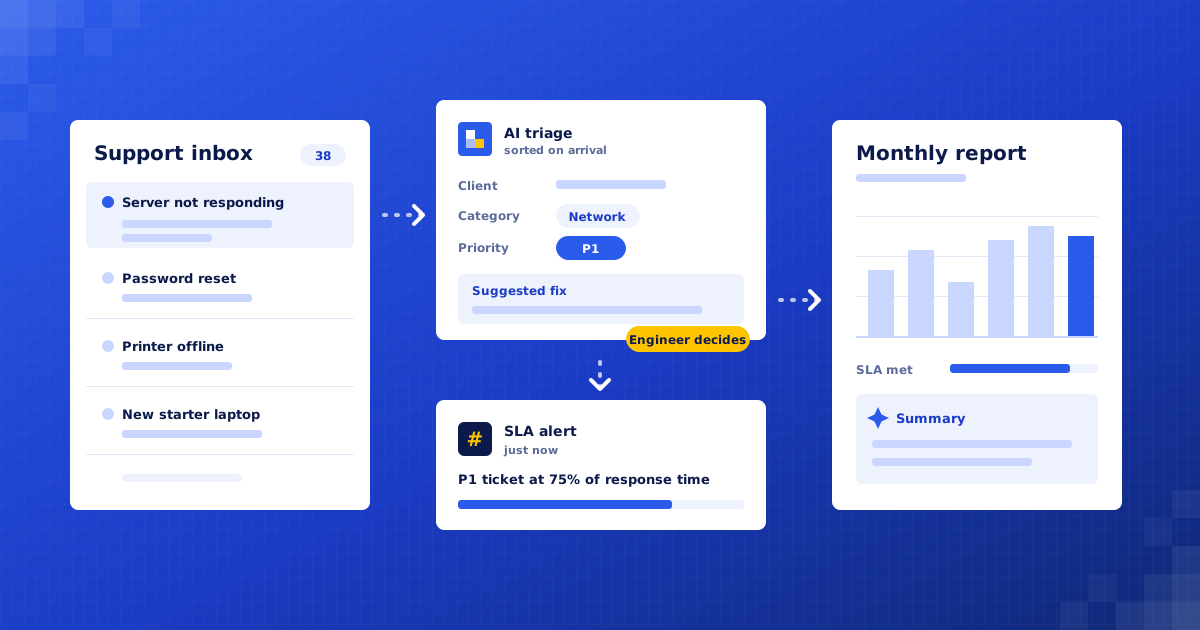
An example managed IT provider gets AI triage on every support email, early SLA warnings, onboarding checklists and a monthly report per client, with engineers handling anything risky.
Example project · Updated
The problem
A managed IT services provider in Bengaluru with 14 engineers looking after around 40 business clients, from dental clinics to a 200-seat manufacturer.
- Categorise, prioritise and route every ticket within minutes of it arriving.
- Warn the team before an SLA is breached, not after.
- Give engineers a suggested fix from past tickets, and send every client a monthly report without manual assembly.
How it works
Ticket Autopilot, step by step
- 01Collect every ticketn8n
- 02Match the clientFreshdesk
- 03Categorise and prioritiseClaude
- 04Suggest a fixClaude
- 05Route to the right engineerFreshdesk
- 06Watch every SLAMicrosoft Teams
- 07Onboard new clients the same wayMicrosoft Planner
- 08Build the monthly client reportClaude + Google Docs
Full project details +Hide details −
The situation
They receive about 1,500 support emails and portal tickets a month into a shared helpdesk. A dispatcher reads each one, works out which client it is from, sets a category and priority, and assigns an engineer. Each client has its own SLA in a contract PDF. At month end, account managers build a report for every client by hand from helpdesk exports and spreadsheets.
Triage is a bottleneck. One dispatcher sorts every ticket, so on a busy Monday morning a 'server down' email can sit behind thirty password resets.
SLAs are tracked from memory. Response and resolution times differ by client and by priority, and a breach is usually noticed after it has happened, often by the client.
Engineers solve the same problems again and again. The fix for a printer or VPN issue at one client is buried in an old ticket that nobody can find quickly.
New clients are onboarded from a checklist in someone's head. Steps such as backup checks, admin account handover and documenting the network get missed, and the gaps show up months later.
Monthly client reports take account managers two or three days. They copy numbers from exports, write a summary, and the reports still go out late.
Each step
1. Collect every ticket. Support emails, portal submissions and after-hours voicemail transcripts all land in the existing helpdesk. An n8n workflow picks up each new ticket as it arrives.
2. Match the client. The sender's email domain and name are matched to the client list in the helpdesk. Unknown senders are held for the dispatcher instead of being guessed.
3. Categorise and prioritise. Claude reads the ticket and sets a category (access, email, network, hardware, backup, security) and a priority against rules the service manager agreed. Anything that mentions a possible breach, ransomware or data loss is marked urgent and sent straight to a senior engineer.
4. Suggest a fix. Similar resolved tickets from the same client and across clients are found and summarised into a short suggested fix, added as a private note. The engineer decides whether to use it. Nothing is changed on a client system automatically.
5. Route to the right engineer. Tickets are assigned by client, skill and current workload. Each engineer sees their queue in priority order with the client's SLA shown on every ticket.
6. Watch every SLA. The SLA for each client and priority is stored once. When a ticket reaches 75% of its response or resolution time, the assigned engineer gets a Teams message. At 90%, the team lead is told as well.
7. Onboard new clients the same way. When a new client is added, a standard onboarding checklist is created as tasks with owners and due dates: network documentation, admin account handover, backup test, device inventory. Overdue items are flagged in the weekly digest.
8. Build the monthly client report. On the first working day of the month, each client's tickets, response times, SLA performance and recurring issues are pulled into a report with a short plain-English summary. The account manager reviews and edits it before it is sent.
What we build
Triage agent. Matches the client, sets category and priority, and routes each ticket within minutes.
Fix suggester. Adds a private note with a suggested fix based on similar past tickets.
SLA watcher. Warns engineers and team leads before response and resolution deadlines are missed.
Onboarding checklist. Creates the same set of tasks with owners for every new client.
Monthly report builder. Drafts one report per client from helpdesk data for the account manager to check.
Connects to: Freshdesk, Claude, n8n, Microsoft Teams, Microsoft 365, Microsoft Planner, Google Docs, NinjaOne.
People stay in control
Engineers carry out every fix. The system suggests, it never changes client systems on its own.
Possible security incidents skip the queue and go to a senior engineer, never to an automated reply.
The service manager owns the category, priority and SLA rules and can change them without a rebuild.
Account managers read and approve every monthly report before a client sees it.
Rollout
Week 1: Audit the helpdesk. Read a sample of recent tickets, collect every client's SLA, and agree categories and priority rules with the service manager.
Weeks 2–3: Build triage and SLA alerts. Connect the helpdesk and Teams. Build client matching, triage, fix suggestions and the SLA watcher.
Week 4: Shadow mode on live tickets. The agent suggests category, priority and engineer, but the dispatcher still decides. We compare and fix the gaps.
Weeks 5–6: Go live, then reports and onboarding. Turn on automatic triage, add the onboarding checklist and run the first monthly reports alongside the manual ones.
Where the value comes from
Urgent tickets reach an engineer sooner. Every ticket is sorted as it arrives, so a real outage is not stuck behind routine requests.
Fewer SLA breaches. Engineers and leads are warned before a deadline, while there is still time to act.
Faster fixes for repeat problems. A suggested fix from past tickets is waiting on the ticket, so less time goes on searching.
Consistent onboarding. Every new client gets the same checklist, so steps such as backup tests are not skipped.
Reports go out on time. Account managers check a ready draft instead of building each report from exports.
What to measure: Median time from ticket arrival to assignment; SLA breaches per month, by client; Share of triage decisions changed by the dispatcher; Share of suggested fixes engineers used; Hours spent on monthly client reports.
Your numbers
What could this be worth to you?
These are your inputs, not our claims. Change any number to match your business.
Time and money saved, estimated
₹63,000
per month · ₹7,56,000 per year
About 90 hours of manual work handled for you each month.
What would this cost?
We give a fixed quote after a free 30-minute audit, once we know your helpdesk, client count and ticket volumes.
Will the AI change anything on our clients' systems?
No. It reads tickets and suggests. Engineers make every change, and anything that looks like a security incident goes straight to a person.
We use ConnectWise, not Freshdesk. Does that matter?
No. The same design works with ConnectWise, Autotask, HaloPSA, Zendesk or any helpdesk with an API. We confirm the details in the audit.

Find your first automation in 30 minutes.
Free audit. Fixed quote after. No surprises.
Book free audit ↗