
Work / Law firms
A client intake and document assistant for a busy law firm
An example law firm gets structured intake, conflict-check prep, enquiry triage, document summaries and deadline tracking, with lawyers owning all advice.
The problem
A 15-lawyer commercial and property law firm in Amsterdam with offices serving Dutch and international clients.
- Collect complete, structured intake for every enquiry.
- Prepare conflict checks and first summaries so lawyers decide faster.
- Keep every deadline in one place with escalating reminders.
How it works
Intake Clerk, step by step
- 01Structured intake formMicrosoft Forms
- 02Triage the enquiryClaude
- 03Prepare the conflict checkClio
- 04Summarise documentsClaude
- 05Lawyer decidesMicrosoft Teams
- 06Open the matterClio
- 07Track deadlinesMicrosoft Outlook
Full project details +Hide details −
The situation
They get about 150 new enquiries a month by phone, email and a website form. A legal secretary collects details, emails a lawyer to run conflict checks, and sets up the matter. Court and contract deadlines are tracked in Outlook calendars and personal notes.
Intake is slow and uneven. Enquiries arrive with missing names, wrong opposing parties or no documents, so a secretary has to go back and forth before a lawyer can even look.
Conflict checks depend on whoever is free. Spelling variations and company groups make it easy to miss a related party.
Lawyers spend non-billable hours reading long documents just to decide whether to take a matter on.
Deadlines live in too many places. A missed limitation date or filing deadline is the kind of error a firm cannot afford.
Each step
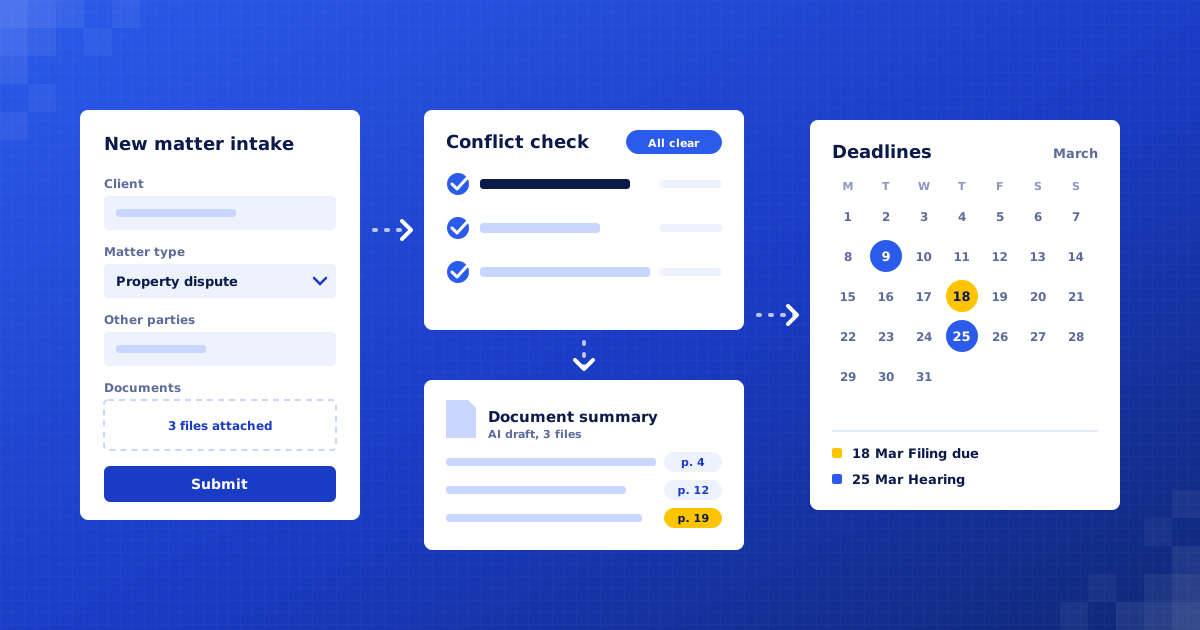
1. Structured intake form. Website and email enquiries are guided through a short form in Dutch or English: who the client is, the other parties, the type of matter, key dates and documents. Missing fields are asked for politely before a person sees it.
2. Triage the enquiry. The enquiry is sorted by practice area and urgency. Anything with a near deadline, such as a court date this week, is flagged to the duty lawyer straight away. Matters the firm does not handle get a polite referral note for a lawyer to approve.
3. Prepare the conflict check. All named parties are extracted, including company groups and spelling variants, and searched against the client and matter database. The result is a list of possible matches for a lawyer to review, never an automatic clearance.
4. Summarise documents. Uploaded contracts, letters and judgments are summarised into parties, key terms, dates and open questions, with page references so the lawyer can check every point against the source.
5. Lawyer decides. The lawyer sees one intake card with the enquiry, conflict results and summary, and chooses to accept, decline or ask for more. Only then does anything go to the prospective client.
6. Open the matter. On acceptance, the matter is created, the engagement letter drafted from the firm's template, and the client ID check requested. The lawyer reviews and sends the letter.
7. Track deadlines. Dates found in documents and entered by lawyers go into one deadline register. Reminders escalate from the responsible lawyer to a supervising partner as a deadline nears and is not marked done.
What we build
Intake assistant. Collects complete, structured enquiries in Dutch and English.
Conflict-check prep. Extracts parties and searches the client database for possible matches.
Document summariser. Produces cited summaries of incoming documents for the lawyer.
Deadline register. One list of matter deadlines with escalating reminders.
Intake board. A Teams view of new enquiries awaiting a lawyer's decision.
Connects to: Microsoft 365, Microsoft Teams, Microsoft Outlook, SharePoint, Clio, Claude, Power Automate, DocuSign.
People stay in control
Lawyers give all legal advice. The assistant never advises or accepts a client.
Conflict results are reviewed and cleared by a lawyer, never automatically.
Every outgoing message to a prospective client is approved by a lawyer or secretary.
Documents stay inside the firm's Microsoft tenant, and the AI provider does not train on them.
Rollout
Week 1: Audit intake and risk. Map how enquiries arrive and how conflicts and deadlines are handled today. Agree confidentiality rules with the managing partner.
Weeks 2–3: Build inside the firm's tenant. Set up forms, the conflict search, summaries and the deadline register within Microsoft 365 and Clio.
Week 4: Test on closed matters. Run intake and summaries on past matters, so lawyers can compare the output with what they already know.
Weeks 5–6: Go live and tune. Start with one practice group. Review every summary and conflict list for the first weeks, then extend.
Where the value comes from
Faster replies to new clients. Enquiries arrive complete and triaged, so a lawyer can decide the same day instead of after several emails.
More billable time. Reading and summarising first-look documents is done before the lawyer opens the file.
Lower risk on conflicts. Every party and spelling variant is searched every time, and a lawyer reviews a clear list of possible matches.
Fewer missed deadlines. Deadlines sit in one register with reminders that escalate, rather than in personal calendars.
What to measure: Time from enquiry to lawyer decision; Share of enquiries arriving complete; Lawyer time spent on intake per matter; Deadlines closed on time; Enquiry to engaged client rate.
Your numbers
What could this be worth to you?
These are your inputs, not our claims. Change any number to match your business.
Time and money saved, estimated
€4,500
per month · €54,000 per year
About 75 hours of manual work handled for you each month.
What will this cost?
We give a fixed quote after a free 30-minute audit, once we understand your intake process and systems.
How do you keep client information confidential?
Everything runs inside your own Microsoft tenant and practice system, using AI services that do not train on your data, with access limited by role.
We use a different practice management system. Is that a problem?
No. We work with Clio, Legalsense, Basenet and others with an API, or with SharePoint if you do not use one.

Find your first automation in 30 minutes.
Free audit. Fixed quote after. No surprises.
Book free audit ↗