Tally Gmail integration: turn emailed supplier invoices into TallyPrime vouchers
TallyPrime can send through Gmail. It can't read your inbox. The missing half is a Gmail label, an AI-read PDF, a draft voucher, your approval, then Tally.

Henil Mehta · Automation Expert
· 9 min read
Short answer
TallyPrime's own Gmail connection only sends. It signs in with Google's gmail.send permission, and Tally says it "cannot view or read your mailbox", so it can't pick up supplier invoices from your inbox. Docs by Ira doesn't take files from email or cloud drives either. To get emailed invoices into TallyPrime you need a separate workflow: a Gmail label collects the invoice emails, AI reads each PDF into a draft purchase voucher, a person approves it, and only then is it posted to Tally.
The invoices are already in Gmail. Why is someone still typing them?
Take a hardware trader in Rajkot with about forty regular suppliers (an example, not a client). Most of them email a PDF invoice. Every evening, the accountant opens Gmail, downloads each attachment, and types supplier, GSTIN, invoice number, items and GST into TallyPrime, one voucher at a time. The ones that got buried under order emails turn up at month end.
When owners search for a Tally Gmail integration, this is usually what they want: the invoice arrives in Gmail and shows up in TallyPrime without anyone typing it. TallyPrime does have a Gmail login now, so it's fair to assume it handles this. It doesn't, and the reason is written in Tally's own policy.
Why most Tally Gmail integration results won't help you
If you've searched this already, you've seen Zapier, Pipedream and Relay pages promising to connect Tally and Gmail in a few clicks. Read them closely. Almost all of them are about Tally.so, an online form builder that happens to share the name. They send an email when someone fills a form. They have nothing to do with TallyPrime or your purchase register.
The results that are about TallyPrime mostly explain how to send invoices out through Gmail. Useful, but it's the opposite direction.
The missing flow: Gmail label to TallyPrime voucher
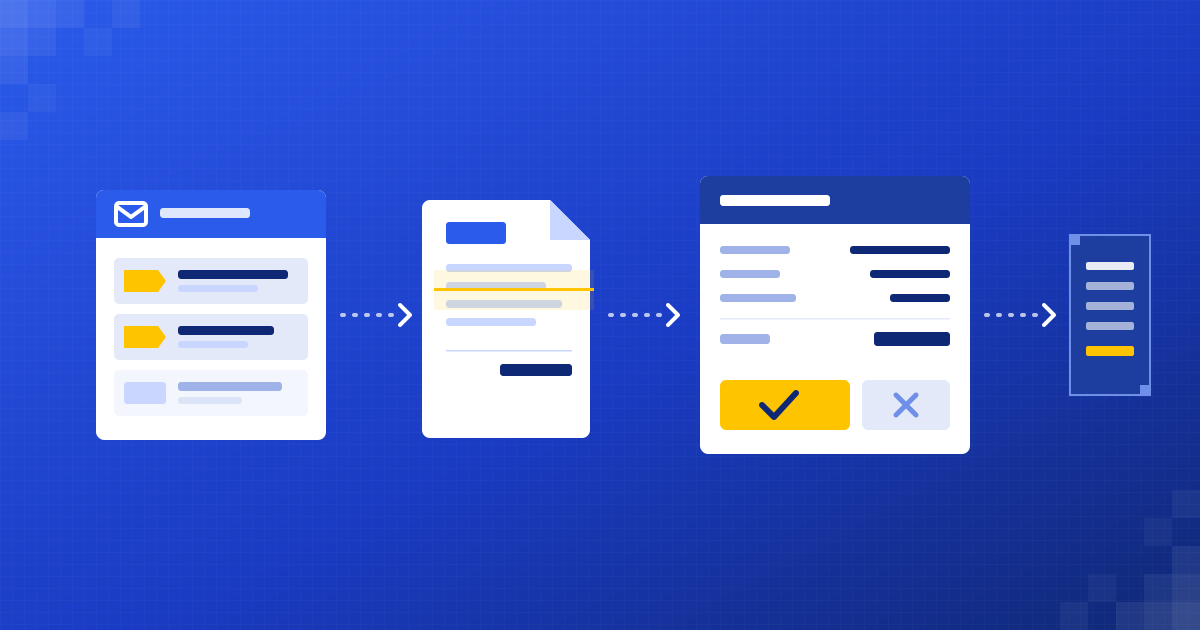
The flow we set up has seven steps, and each one is boring on purpose.
- A Gmail filter labels supplier invoices. In Gmail, open Show search options, describe the emails (for example from: a supplier's address and has:attachment filename:pdf), click Create filter and send them to a label such as Invoices/To-enter.
- A workflow watches that label. In n8n, the Gmail Trigger polls for new messages and can be limited to specific labels, so it never touches the rest of your inbox.
- AI reads the PDF and pulls out supplier, GSTIN, invoice number, date, line items, taxable value and the CGST, SGST or IGST split.
- Code checks the numbers: line items add up to the total, the GST split matches the supplier's state, and the invoice number hasn't been entered before. The supplier is matched to its ledger in TallyPrime.
- A draft purchase voucher goes to a person for approval (more on this below).
- Once approved, the voucher is posted to TallyPrime over its XML interface. Tally's developer docs say TallyPrime must be running as a server with the HTTP listener on, default port 9000.
- The email gets a new label, Invoices/Entered, and the PDF is filed, so you can always trace a voucher back to the mail it came from.
The integration page at /integrations/gmail-to-tally/ has the short version and the typical setup time. This post is the detail behind it.
The approval step: nothing reaches your books until a person says yes
This is the step I'd never skip, and it's where I'd judge anyone who builds this for you.
The accountant gets each draft with the original PDF next to it: supplier and ledger, invoice number and date, each line with its stock or expense item, taxable value, GST and total. Three choices: approve, edit then approve, or reject with a note.
- Approve, and the voucher goes to TallyPrime as it is.
- Edit, and the accountant's fix (a ledger, a quantity) is what gets posted. Those corrections are worth reading every week, because they show where the AI keeps getting it wrong.
- Reject, and the email goes back to a label like Invoices/Check, with the reason. Duplicates, supplier statements and quotations that slipped through the filter end up here.
Some things should never get as far as a draft. If the totals don't add up, the GSTIN is missing, or the supplier isn't in Tally yet, the workflow flags it and asks a person instead of guessing a ledger.
Docs by Ira works on a similar idea. Its imports land in a Draft Transactions report, and your company data changes only when someone saves them as vouchers. I like that Tally built it this way.
What Gmail access does this need?
Before you sign anything, know that reading invoices needs more Gmail access than TallyPrime asks for.
In Google's scope list, gmail.send is a sensitive scope, while gmail.readonly ("View your email messages and settings") and gmail.modify are restricted. Restricted scopes need Google's OAuth app verification, and if the data is stored or passed through servers, a security assessment as well. gmail.labels, for seeing and editing labels, is non-sensitive.
To keep that access narrow, I'd do four things:
- Use a separate mailbox for supplier invoices, such as accounts@ or invoices@, and ask suppliers to send there. Then the workflow can't see the owner's personal mail even in theory.
- Limit the workflow to one label, so it only processes what your filter put there.
- Ask where the PDFs and extracted data are stored, and for how long.
- Keep the Tally side on your own network. The XML server listens on the machine running TallyPrime, so it shouldn't be open to the internet.
One example worth a look: ICAI's AI use-case library has a CA's Python tool that does a version of this on a desktop. It pulls the day's PDF invoices from selected senders through the Gmail API, builds an Excel register for the accountant to check, and generates Tally XML for masters and vouchers, keeping the files on the user's own system.
Can Docs by Ira do this instead?
For some businesses, yes, with one manual step. Download the attachments from Gmail into a folder and import them into Docs by Ira. Check these points from Tally's FAQ first:
- You need TallyPrime 7.0 or later, an active TSS subscription and an Indian licence.
- The free allowance is up to 100 pages over two months, then you upgrade the plan.
- It reads English, digitally created PDFs and images. Handwritten bills, Word and Excel files, bank statements and multilingual invoices aren't supported.
- Each file should hold one transaction, and the TallyIra app sends up to 10 files at a time.
- It covers eight voucher types, including Purchase, Credit Note and Debit Note.
If your suppliers send clean, English PDFs and the volume is modest, I'd try Ira before paying anyone to build a workflow. The download step is the only manual part left. What it won't do is watch Gmail for you, or apply your own rules before the draft appears.
When a Tally Gmail integration isn't worth it
I'd tell you to skip it in these cases:
- Only a handful of supplier invoices arrive by email each month. Typing them, or using Ira, costs less than building and maintaining a workflow.
- Most invoices reach you as WhatsApp photos or paper. Gmail isn't your bottleneck, so a photo-and-upload route like /integrations/invoices-to-tally/ fits better.
- Your suppliers send one PDF with several invoices, or a statement instead of invoices. Split that at the source first, because no reader handles it reliably.
- TallyPrime runs on a laptop that's switched off half the day. Posting needs Tally running and reachable.
- Your ledgers are a mess. Duplicate supplier ledgers and vague expense heads make matching unreliable, so clean the masters before you automate anything.
Want your supplier invoices to go from Gmail to TallyPrime?
We put AI agents on top of the tools you already use, and a person approves every voucher before it reaches your books. See how the Gmail to TallyPrime setup works at /integrations/gmail-to-tally/, or email tea@dizilus.com with how many invoices arrive by email each month and I'll tell you honestly whether Ira is enough.
Questions people ask
Can TallyPrime read emails from Gmail?
No. TallyPrime's Gmail connection uses the gmail.send permission only. Tally's policy calls it send-only and says it cannot view or read your mailbox, so incoming invoices need a separate workflow or a manual download.
How do I connect Gmail to TallyPrime to send invoices?
Open the invoice, press Ctrl+M, pick an email profile, then press L to log in via the browser. Sign in with Google, allow "Send email on your behalf", return to TallyPrime and press S to verify and send.
Can Docs by Ira import invoices straight from Gmail?
Not according to Tally's FAQ. Ira takes files from your computer, from Autofill during voucher entry or from the TallyIra app, and it can't import from Google Drive or OneDrive. Email isn't listed as a source, so you'd download the attachments first.
Is it safe to give an invoice workflow access to Gmail?
It can be, if the access is narrow. Reading mail needs a restricted Google scope, so use a separate invoices mailbox, limit the workflow to one label, and ask where the PDFs and extracted data are stored.
Will vouchers be posted to Tally without anyone checking?
Not in the way we set it up. Every draft voucher goes to a person, who approves, edits or rejects it before it's posted to TallyPrime.
Written by
Automation Expert at Dizilus. You talk to the people who build your automations, not a sales rep.